

This guide explains what Core Web Vitals actually measure and why they affect your rankings, how to determine whether your site needs a targeted fix or a full rebuild, what to look for in an agency capable of doing this work correctly, and the mistakes that cause businesses to pay for optimization that does not hold.
What Core Web Vitals Are and Why a Low PageSpeed Score Costs You Rankings
Google’s Core Web Vitals are three specific performance metrics that measure how users experience a page as it loads. Google incorporated them as a confirmed ranking signal in its Page Experience ranking system, which means pages that fail these metrics are at a measurable disadvantage in search results compared to pages that pass them, all else being equal. The metrics are not abstract speed scores. Each one measures a distinct dimension of how a real visitor experiences your page.
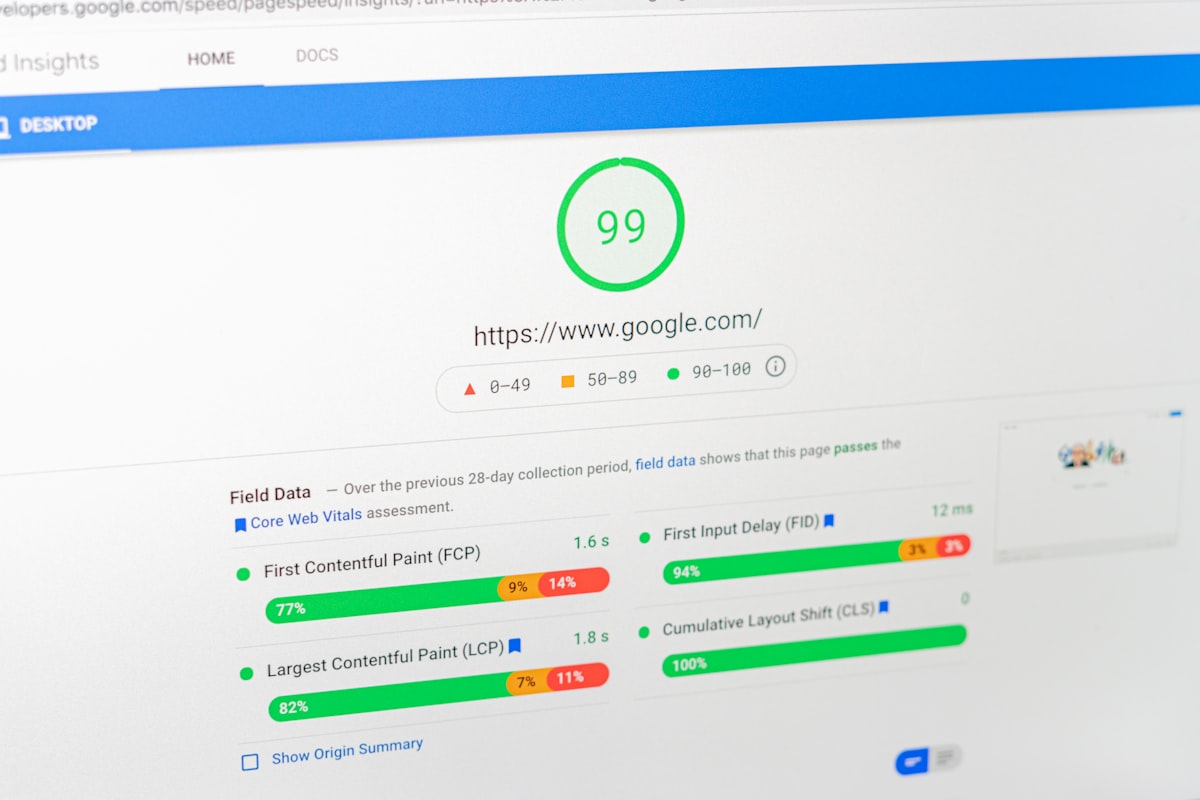
Your Google PageSpeed Insights score is a composite that reflects performance on these and additional metrics. A score below 50 on mobile is a reliable signal that at least one Core Web Vital is failing at the “Poor” threshold. The score between 50 and 89 indicates problems that affect experience and rankings even if they are not catastrophic. A score of 90 or above on mobile means your site passes all Core Web Vitals thresholds, which is the goal of any remediation engagement.
Fix vs. Rebuild: How to Determine Which One Your Site Actually Needs
The single most important decision in a Core Web Vitals remediation engagement is whether to optimize the existing site or rebuild it on a cleaner technical foundation. Both paths can reach the same destination, but the right choice depends on what is causing your failures, how the site was originally built, and how much technical debt has accumulated in the codebase.
| Situation | Targeted Optimization | Full Rebuild |
|---|---|---|
| Root cause of failures | Unoptimized images, missing lazy loading, no caching layer, render-blocking scripts that can be deferred or removed without restructuring the build. | Bloated plugin architecture, a theme with hundreds of unneeded assets loading on every page, or a page builder that generates excessive DOM complexity no optimization pass can fully resolve. |
| Current PageSpeed score (mobile) | Scores in the 40 to 65 range. Problems are real but concentrated in a defined set of addressable issues. | Scores below 30 on mobile, or consistent failures across all three Core Web Vitals despite prior optimization attempts. |
| Site age and build quality | A site built 2 to 4 years ago by a competent developer on a lightweight theme with a manageable plugin count. | A site built on a heavy drag-and-drop page builder like Elementor, Divi, or WPBakery with 25 or more active plugins and no performance architecture from the original build. |
| Time to results | Score improvements visible within 2 to 4 weeks of a focused optimization engagement. Google’s index typically reflects ranking improvements within 4 to 8 weeks. | Rebuild timelines of 8 to 16 weeks depending on scope, followed by Google reindexing. Total time to ranking recovery is longer but the result is structurally durable. |
| Cost range | Targeted optimization engagements typically run $1,500 to $4,000 depending on site complexity and how many issues require custom development work. | A full rebuild scoped for performance compliance typically runs $8,000 to $20,000, overlapping with a full redesign engagement when design is also included in scope. |
| Risk of recurrence | Moderate. If the underlying architecture remains plugin-heavy or page-builder-dependent, future updates can re-introduce the same failures. Requires ongoing monitoring. | Low. A rebuild on a performance-first architecture establishes a clean baseline that is significantly easier to maintain at passing scores over time. |
The Diagnostic Audit Determines the Path
No competent agency can tell you whether you need an optimization or a rebuild without first running a full diagnostic audit of your site’s performance issues, code architecture, and hosting environment. Any agency that quotes you a price for Core Web Vitals remediation before completing that audit is guessing at the scope. Ask for the audit first, and evaluate the agency’s technical fluency by the quality of the diagnostic report they produce before you commit to a remediation engagement.
What Causes Core Web Vitals Failures on Small Business Websites
The causes of poor Google PageSpeed scores on small business websites are predictable and follow a consistent pattern. Understanding them lets you have a more informed conversation with any agency you evaluate, and lets you identify whether their proposed solution actually addresses the root causes of your specific failures.
Unoptimized Images
Images account for the majority of page weight on most small business websites, and they are the most common cause of LCP failures. An image uploaded at 4MB that displays at 400px wide is loading 10 to 15 times more data than necessary. The fix involves converting images to next-generation formats like WebP or AVIF, compressing them without visible quality loss, serving them at the correct display size, and implementing lazy loading so images below the fold do not compete with the loading of the main content area.
Render-Blocking Resources
CSS and JavaScript files that load before the page can render its main content create an LCP delay that is invisible to the visitor for the first second and then experienced as a blank or incomplete page. The fix requires identifying which scripts and stylesheets are render-blocking, deferring or asynchronously loading those that are not needed for the initial view, and eliminating those that are loaded by plugins the site no longer actively uses but has not removed.
Slow Server Response Times
A site on shared hosting with a slow Time to First Byte (TTFB) compounds every other performance problem because every resource on the page has to wait for the server to respond before it can begin loading. Shared hosting with a TTFB above 600ms is a common bottleneck on small business sites, and no amount of image optimization will fully compensate for a server that responds slowly. The fix involves moving to a faster hosting provider, implementing server-side caching, and using a content delivery network to reduce latency for visitors located far from the server.
Layout Shift From Unsized Elements
When images, ads, embeds, or fonts load without explicit width and height attributes, the browser reserves no space for them and the page layout shifts as they pop in. This is the primary cause of high CLS scores and is often introduced by plugins that inject content without dimension attributes. The fix requires adding explicit size attributes to every element that can shift the layout, reserving space for third-party embeds, and using font-display swap to prevent invisible text and layout shift during font loading.
Excessive JavaScript Execution
Heavy JavaScript from page builders, chat widgets, marketing scripts, and plugin bundles is the primary cause of high INP scores and contributes significantly to LCP delays. A WordPress site with 30 active plugins often loads 2 to 4 megabytes of JavaScript that must be parsed and executed before the page becomes fully interactive. The fix involves auditing which scripts are necessary, removing or replacing those that are not, deferring all non-critical JavaScript, and in severe cases, rebuilding on a leaner platform architecture.
Page Builder Architecture
Drag-and-drop page builders like Elementor, Divi, and WPBakery generate significantly more HTML, CSS, and JavaScript than hand-coded or block-editor WordPress builds. A page built with Elementor can contain 3 to 5 times the DOM nodes of an equivalent page built with clean HTML and CSS, which directly inflates load time, parse time, and layout calculation time. For sites with severe performance failures rooted in page builder architecture, optimization passes produce diminishing returns and a rebuild on a leaner foundation is the structurally sound solution.
How to Evaluate Whether an Agency Can Actually Fix Core Web Vitals
Performance optimization is a technical discipline, and the gap between an agency that understands it and one that does not is wide. The questions below surface that gap before you have paid for work that does not hold. An agency with genuine Core Web Vitals expertise can answer every one of these questions specifically. An agency without it will give you answers that sound technical but contain no verifiable information.
- Ask them to identify the specific metric causing your worst PageSpeed failures before you discuss scope or pricing. Run your site through PageSpeed Insights yourself and share the URL with any agency you are evaluating. Ask them to look at the diagnostics and tell you which specific issues are causing your LCP, CLS, and INP failures. An agency that can name the specific causes from your actual report, rather than describing common causes in general terms, has done this diagnostic work before. An agency that responds with a package description rather than a site-specific analysis is not starting from your actual problem.
- Ask what their target PageSpeed score is after remediation and how they will document the improvement. The answer should be specific: a mobile score of 90 or above, verified in PageSpeed Insights, with before-and-after screenshots of the diagnostic report as documentation. An answer that uses words like “significant improvement” or “much better performance” without a specific score target is not a performance commitment. It is a promise designed to be unfalsifiable.
- Ask whether they recommend optimization or rebuild for your specific site and why. The reasoning tells you more than the recommendation. An agency that recommends a rebuild on every site is upselling scope. An agency that recommends optimization for a site built on Elementor with 35 plugins and a mobile score of 18 does not understand the technical limits of optimization on that architecture. The correct answer to this question requires having looked at your specific site and understanding what its codebase will and will not permit.
- Ask how they handle hosting as part of the engagement. Server response time and hosting infrastructure are often the largest single contributor to LCP scores, and an agency that optimizes your site without addressing a slow hosting environment will see limited results. Ask specifically whether they assess your current hosting as part of the diagnostic, whether they recommend or configure a CDN, and whether server-side caching is included in the remediation scope. An agency that does not mention hosting in the context of a PageSpeed remediation engagement has an incomplete model of what causes performance failures.
- Ask to see before-and-after PageSpeed scores for a previous client engagement. Not a testimonial about how much faster the site feels. Actual before-and-after screenshots from Google PageSpeed Insights showing the score on mobile, the specific metrics that improved, and what score the site achieved post-remediation. An agency that has done this work successfully has these documents and shares them readily as part of their portfolio.
The Mistakes That Cause Core Web Vitals Fixes to Fail or Regress
A significant share of performance optimization engagements produce initial score improvements that regress within 90 to 180 days. Understanding the causes of that regression pattern helps you evaluate whether an agency’s proposed approach will hold, or whether you will be back at the same problem in six months.
Warning: Optimizing the Surface Without Fixing the Architecture
The most common failure pattern in Core Web Vitals remediation is an agency that compresses images, enables a caching plugin, and defers a few scripts, achieves a temporary score improvement, and delivers the engagement as complete. Six months later, a plugin update, a new image uploaded without compression, or a marketing script added by the client reintroduces the same failures. Optimization that does not address the underlying architectural causes of performance failures, heavy page builders, excessive plugin counts, slow hosting infrastructure, produces results that are inherently fragile. Ask any agency you evaluate to describe specifically how they prevent score regression after the engagement ends.
The second common failure mode is treating Google PageSpeed Insights as the only measurement tool. PageSpeed Insights uses a combination of lab data and real-world field data from the Chrome User Experience Report (CrUX). A site can show improved lab scores in PageSpeed Insights while still failing Core Web Vitals in the field data that Google actually uses for ranking. Ask any agency you evaluate whether they distinguish between lab scores and field data, and whether they monitor your site’s Core Web Vitals status in Google Search Console after the engagement, where real-user field data is reported.
For businesses that need a site rebuilt from a performance-first foundation, the technical architecture decisions made before a line of code is written determine whether the site holds its scores over time. Agencies like Creasions build Core Web Vitals compliance into the technical specification of every new site, treating LCP, CLS, and INP thresholds as design constraints rather than post-launch optimization targets.
What a Successful Core Web Vitals Remediation Engagement Delivers
A well-executed Core Web Vitals remediation engagement produces three measurable outcomes: a Google PageSpeed mobile score of 90 or above, passing status on all three Core Web Vitals in Google Search Console field data, and documented ranking improvement on target pages within 60 to 90 days of the field data reflecting the fixes.
The agencies that deliver durable results in this work treat hosting, image delivery, code architecture, and plugin management as interconnected systems rather than as independent optimization tasks. They document the diagnostic state before work begins, set a specific score target, verify the result in both PageSpeed Insights and Search Console after deployment, and monitor the field data over the following 30 to 60 days to confirm that the improvements are holding in real-user data. That full cycle, from diagnostic through post-deployment monitoring, is what distinguishes a performance engagement from a one-time score-improvement task. For small businesses in Dallas and across Texas, getting this work done by an agency that understands the full cycle is the difference between ranking recovery and a temporary score bump that regresses within a quarter.
Frequently Asked Questions
Does a bad Google PageSpeed score actually affect my search rankings?
Yes. Google confirmed Core Web Vitals as a ranking signal in its Page Experience update, which has been fully rolled out since 2022. Pages that fail Core Web Vitals thresholds, specifically LCP above 4 seconds, CLS above 0.25, or INP above 500ms, are at a ranking disadvantage compared to pages that pass them, all other ranking factors being equal. The effect is most pronounced in competitive search markets where multiple pages of similar quality and authority are competing for the same position, and it is measured using real-user field data from Chrome browsers rather than from lab simulations.
What is the difference between a PageSpeed score and Core Web Vitals?
Your Google PageSpeed Insights score is a composite number from 0 to 100 that reflects performance across multiple metrics, including the three Core Web Vitals and several additional lab-based metrics. Core Web Vitals are the three specific metrics Google uses as ranking signals: Largest Contentful Paint (LCP), Cumulative Layout Shift (CLS), and Interaction to Next Paint (INP). A site can have a moderate PageSpeed score in the 60s and still pass all Core Web Vitals thresholds. Conversely, a site with a score in the 40s may be failing one or all three Core Web Vitals in the field data Google actually uses for ranking, which matters more than the composite lab score.
Can my current WordPress site be optimized for Core Web Vitals or does it need to be rebuilt?
It depends on how the site was originally built. WordPress sites built on lightweight themes with a manageable plugin count and without a drag-and-drop page builder can often be optimized to passing Core Web Vitals scores without a rebuild. Sites built on Elementor, Divi, WPBakery, or similar page builders with 25 or more active plugins frequently have performance ceilings that optimization cannot overcome because the architectural complexity of the build generates more DOM, CSS, and JavaScript than any optimization layer can fully compensate for. A competent agency should run a diagnostic audit before recommending either path, and the recommendation should be based on your specific site’s codebase, not on which option is more profitable for the agency.
How long does it take to fix Core Web Vitals and see ranking improvements?
Technical fixes can be deployed to a live site in days to weeks depending on scope. Ranking improvements take longer because Google’s Core Web Vitals field data updates on a 28-day rolling window, which means the search index takes 4 to 8 weeks after deployment to fully reflect the improvements in your real-user performance data. For a targeted optimization engagement, expect to see measurable ranking movement 6 to 10 weeks after the work is complete. For a full rebuild, add the rebuild timeline of 8 to 16 weeks to that window. Total time from engagement start to ranking recovery on a full rebuild can range from 4 to 6 months.
How much does it cost to fix Core Web Vitals on a small business website?
A targeted optimization engagement for a small business site with diagnosable, addressable issues typically runs $1,500 to $4,000 depending on the number of issues, the site’s complexity, and whether hosting migration is included in scope. A full rebuild scoped specifically for performance compliance typically runs $8,000 to $20,000, often overlapping with a broader redesign when the site also needs updated design, messaging, and conversion architecture. The higher cost of a rebuild reflects the structural durability of the result: a site rebuilt on a performance-first foundation holds its scores far more reliably than one that has been optimized on top of an architecture not designed for performance.
What should I look for in an agency that can fix my PageSpeed score?
Look for an agency that starts with a diagnostic audit of your specific site before discussing scope or pricing, can name the specific metrics causing your failures and what is causing them, sets a specific PageSpeed score target rather than describing “improvements,” and monitors your field data in Google Search Console after the engagement to confirm that results are holding in real-user data rather than just in lab simulations. Ask to see before-and-after PageSpeed scores from previous client engagements. An agency that has done this work successfully will have those documents and share them without hesitation.
Why does my PageSpeed score keep going back down after I get it fixed?
Score regression almost always traces back to one of three causes: an optimization engagement that treated symptoms without addressing the architectural root cause, plugin updates or new plugin additions that reintroduce render-blocking scripts or layout instability, or images uploaded after the engagement without compression or proper sizing. A durable solution requires either a rebuild on a lighter architecture that is structurally resistant to these regression causes, or an ongoing monitoring arrangement where someone reviews your Core Web Vitals scores in Search Console monthly and flags issues before they accumulate into ranking penalties.
Does hosting affect my Google PageSpeed score?
Yes, significantly. Server response time, measured as Time to First Byte (TTFB), is one of the largest contributors to LCP scores because every other resource on the page cannot begin loading until the server responds. A site on shared hosting with a TTFB above 600ms will struggle to achieve a passing LCP score regardless of how well the rest of the site is optimized. The solution involves moving to a faster managed hosting provider, implementing a content delivery network (CDN) to reduce latency for visitors in different geographic locations, and enabling server-side caching. Any agency you hire for Core Web Vitals remediation should assess your hosting environment as part of the diagnostic, not treat it as outside the scope of the engagement.
Want to Know Whether Your Site Needs Optimization or a Full Rebuild?
Creasions works with small and mid-sized businesses across Dallas and Texas to diagnose Core Web Vitals failures, determine the fastest path to passing scores, and build or rebuild sites that hold their performance over time. If your Google PageSpeed score is costing you rankings and you want a specific diagnosis before committing to a scope, request a free consultation and we will walk you through exactly what is causing your failures and what it would take to fix them durably.